

Stop Content Theft. Shield Your WordPress. Like Never Before.
- WHAT’S INSIDE
- Disable Right-Click
- Disable Text Selection
- Block Keyboard Shortcuts
- Screenshot Protection
- DevTools Detection
- Disable Image Drag & Save
- Watermark Overlay
- Post-Type Targeting
- Exclude Logged-In Users
- WHY NOXCOPY
- FAQ
- Is NoxCopy 100% foolproof?
- Will it affect my Google AdSense approval?
- Will NoxCopy slow down my site?
- Does it work with Elementor, Divi & page builders?
- Does it work with WooCommerce?
- What happens after I buy?
- Your Content Deservesto Stay Yours.
NoxCopy blocks right-click, text selection, keyboard shortcuts, DevTools access, image dragging, and more with zero impact on your site’s performance.
Password: 6121827
Google AdSense Safe Mode Built In:
One click disables the features that can affect AdSense approval, keeping basic protection while you get reviewed. Re-enable everything once you’re approved. “AdSense Friendly ✓”
WHAT’S INSIDE
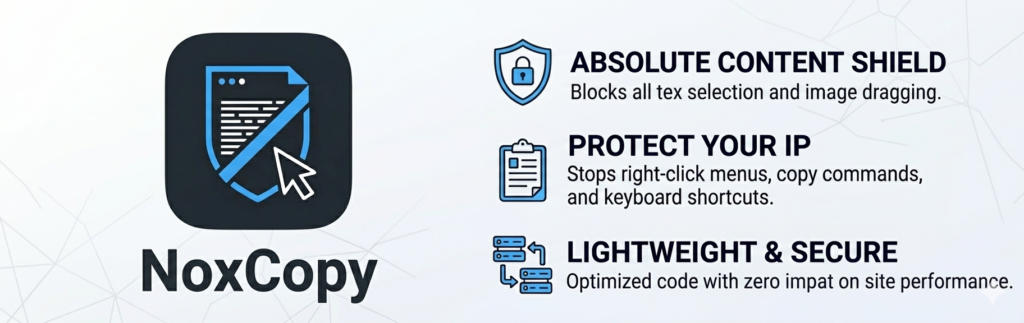
Absolute Content Shield
Every layer of protection you need packaged into one lightweight, zero-dependency plugin.
Disable Right-Click
Block the browser context menu on all content types: posts, pages, products, and custom post types.
Disable Text Selection
Prevent cursor highlighting across all content. Works on desktop and mobile touch devices.
Block Keyboard Shortcuts
Intercepts Ctrl+C, Ctrl+A, Ctrl+U, Ctrl+S, Ctrl+P, Ctrl+X, and F12, the most common copy methods.
Screenshot Protection
It blurs the entire page when the tab loses focus or a print dialog is triggered, defeating screenshotters.
DevTools Detection
Detects when browser developer tools are opened. Show an alert or redirect the visitor to any URL you choose.
Disable Image Drag & Save
Blocks dragging and right-click saving of images. MutationObserver support covers dynamically loaded images.
Watermark Overlay
Add a semi-transparent stamp over your post content with customizable text, opacity, and a live admin preview.
Post-Type Targeting
Choose exactly which post types are protected posts, pages, WooCommerce products, custom types, and more.
Exclude Logged-In Users
Allow your administrators, editors, and contributors to copy and work freely; protections apply only to visitors.
WHY NOXCOPY
NoxCopy vs. The Rest
See how NoxCopy stacks up against generic free plugins.
| FEATURE | NOXCOPY | FREE ALTERNATIVES |
|---|---|---|
| Disable right-click | ✓ | ✓ |
| Disable text selection | ✓ | ✓ |
| Block keyboard shortcuts | ✓ | ✗ |
| DevTools detection | ✓ | ✗ |
| Screenshot blur protection | ✓ | ✗ |
| Image drag & save blocking | ✓ | ✗ |
| Watermark overlay | ✓ | ✗ |
| AdSense Safe Mode | ✓ | ✗ |
| Post-type targeting | ✓ | ✗ |
| Exclude logged-in users | ✓ | ✗ |
| Zero external requests | ✓ | ✗ |
| Active development & support | ✓ | ✗ |
FAQ
Is NoxCopy 100% foolproof?
No browser-side protection is fully unbreakable; a highly technical user can always view raw HTML server responses. NoxCopy stops the vast majority of casual copiers, scrapers, and everyday users effectively. Think of it as a strong lock on a door; it stops almost everyone.
Will it affect my Google AdSense approval?
It can, if you use aggressive settings. That’s why NoxCopy includes a built-in AdSense Safe Mode; one click disables the features most likely to cause issues during review while keeping basic protection active. Once approved, you can enable everything.
Will NoxCopy slow down my site?
No. The frontend protection script is under 3 KB, loads in the footer asynchronously, and makes zero external network requests. You will not notice any performance impact on PageSpeed Insights or Core Web Vitals.
Does it work with Elementor, Divi & page builders?
Yes. NoxCopy is theme- and page-builder agnostic. The protection script runs globally on the front end and is completely independent of how your pages are built or what theme you use.
Does it work with WooCommerce?
Yes. WooCommerce product pages are a public post type and can be included in NoxCopy’s post-type targeting. You can protect product descriptions, images, and content just like any other page.
What happens after I buy?
You’ll receive an email with a download link for the plugin zip file. Upload it in WordPress via Plugins → Add New → Upload Plugin, activate, and you’re protected within minutes. Your license key activates updates.
Your Content Deserves
to Stay Yours.
Join site owners who trust NoxCopy to shield their WordPress content every single day.